Your content calendar is full. Your engagement rate is flat. The problem is rarely volume; it is variety.
The most-shared social media posts of 2026 follow patterns you can replicate today. In this resource, we break down 40 creative social media posts examples from brands across industries, grouped into five strategic categories: Pre-Launch, Spotlight, Educational, Community-Building, and Reactive content. Every example includes what made it work so you walk away with ideas you can execute this week.
Below you will find the complete breakdown, from cryptic product teases to meme-driven engagement plays. Use them to create social media content faster or try Piktochart for free and start designing scroll-stopping visuals in minutes.
40 Creative Social Media Posts & Ideas
We’ve organized these ideas based on when and how to use them – from building pre-launch hype to celebrating major milestones.
Several of the formats below are still underused by most brands in 2026, including cryptic pre-launch sequences, community co-creation polls, and technical deep-dive showcases; making them high-opportunity formats for standing out.
Each post type serves a specific purpose, helping you create content that resonates with your audience and drive meaningful engagement.
Pre-Launch Posts
Whether you’re launching a product, event, or major announcement, the build-up is just as important as the big day.
Pre-launch posts build momentum, spark curiosity, and give your audience a reason to stay tuned.
You can use several types of pre-launch posts, depending on your timeline, what you’re launching, and how much you want to reveal before the big day.
Cryptic announcements
We are curious creatures. We love mystery and intrigue. Cryptic announcements tap into our natural instincts to solve puzzles and uncover secrets, making them perfect for building pre-launch anticipation.
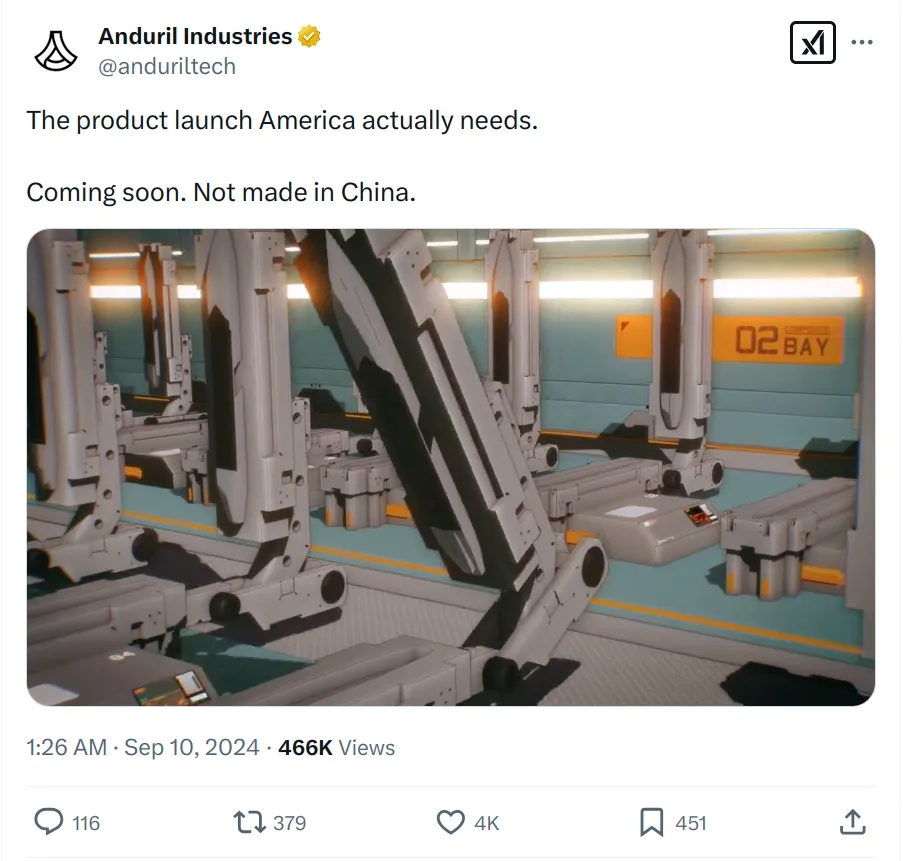

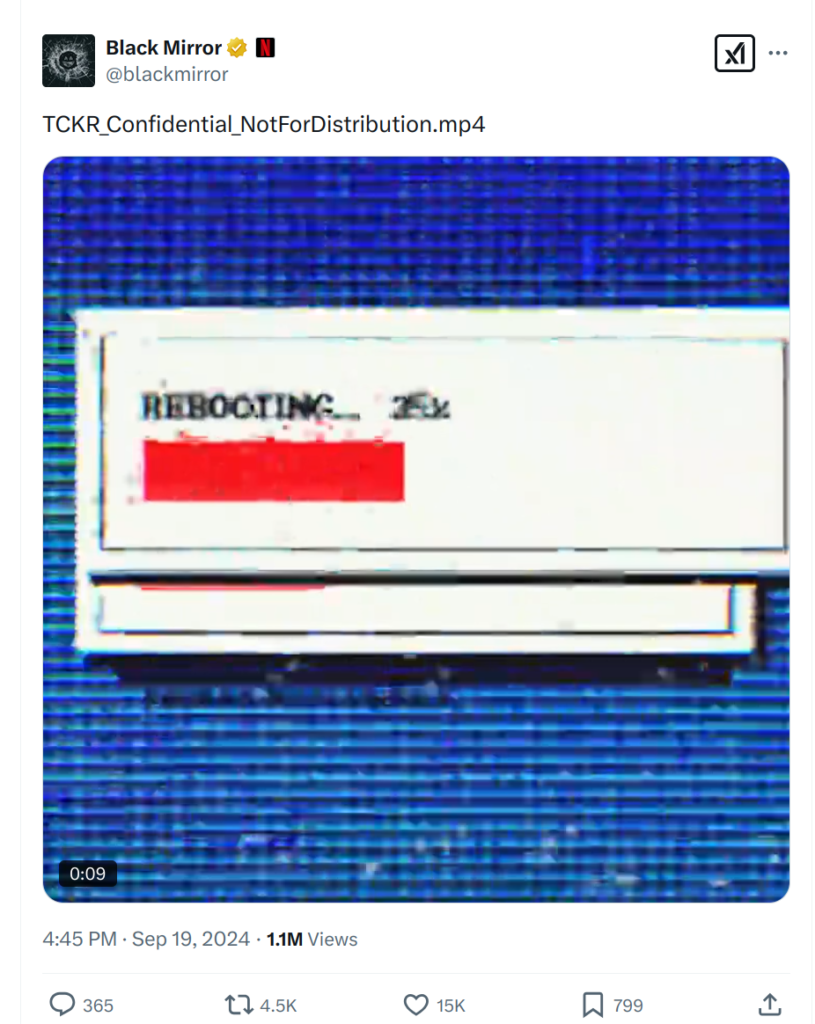
The result? Organic engagement fueled by speculation and anticipation.
The key is finding the sweet spot between intrigue and obscurity. Too obscure, and you’ll lose your audience; too revealing, and you’ll spoil the surprise.
Cryptic announcements work best with an established audience. The goal of this type of post is to set off a chain reaction.
If you pull it off well, people will start speculating about what’s coming, creating organic buzz and anticipation.
Strong visuals are crucial for cryptic announcements. Your image should feel intentionally mysterious rather than simply dark or blurry. Look for dramatic angles and strategic shadows. Keep text minimal. Let the visuals captivate your audience’s attention.
Not a designer? Piktochart’s AI social media post generator can help you create professional-looking teasers that nail this delicate balance, even if you’ve never designed before.
Sneak peeks
Unlike cryptic teasers that thrive on mystery, sneak peeks give your audience a clear, tangible preview of what’s coming, providing a bridge between anticipation and solid information.
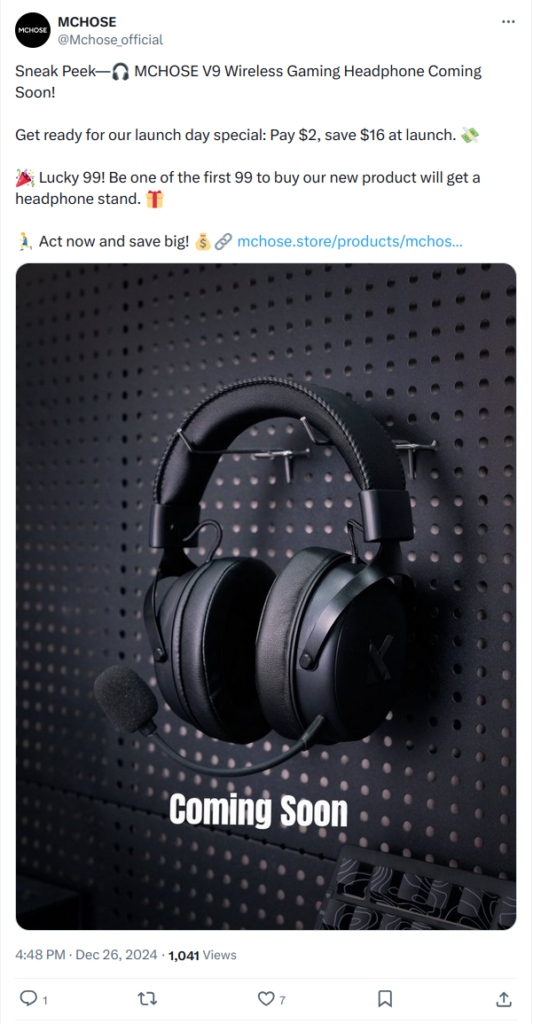
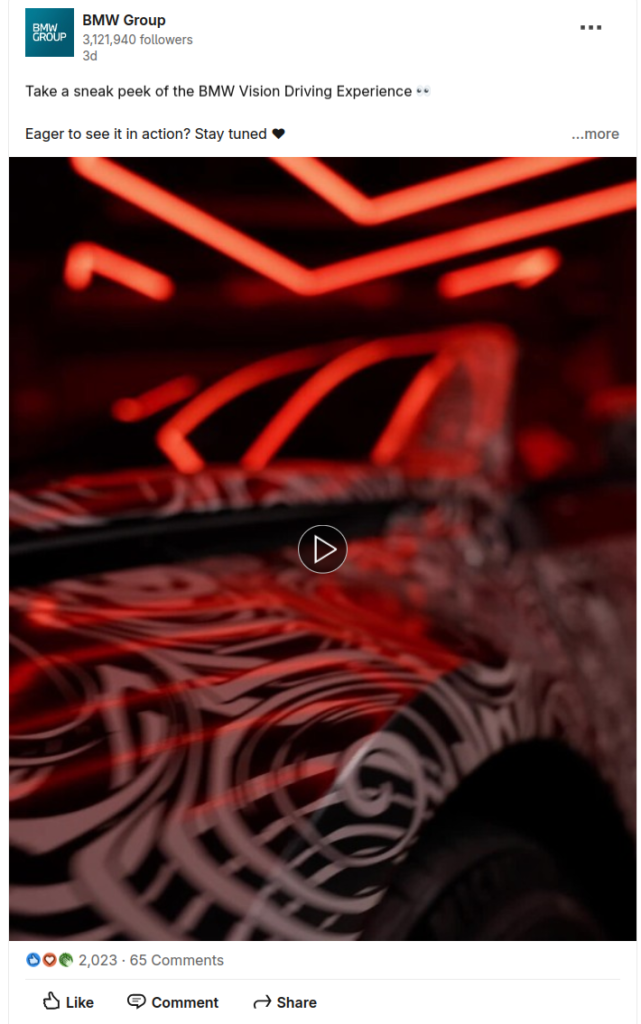
The most common format is a close-up product shot that reveals quality and design while keeping some features under wraps.
Another option is a carefully edited preview that hints at new capabilities.
Think of it as opening the door just enough to pique curiosity without revealing everything at once.
These posts can work with any budget and production value.
Major brands have the budget and know-how to release cinematic teasers and polished renders.But a well-composed product photo or a genuine behind-the-scenes shot can be just as effective.
Focus on highlighting what makes your offering unique. Is it your craftmanship? Innovative features? Or the story behind the product?
Remember, quality storytelling trumps production value every time.
Timing is crucial with sneak peeks. Too early, and you risk losing momentum before launch. Too late, and you miss the opportunity to build anticipation.
Consider releasing them when you’re confident in your launch timeline and have enough final details to share something substantial with your audience.
The big reveal
It’s finally time to pull back the curtain and reveal what you’ve been working on with a show-stopping announcement.
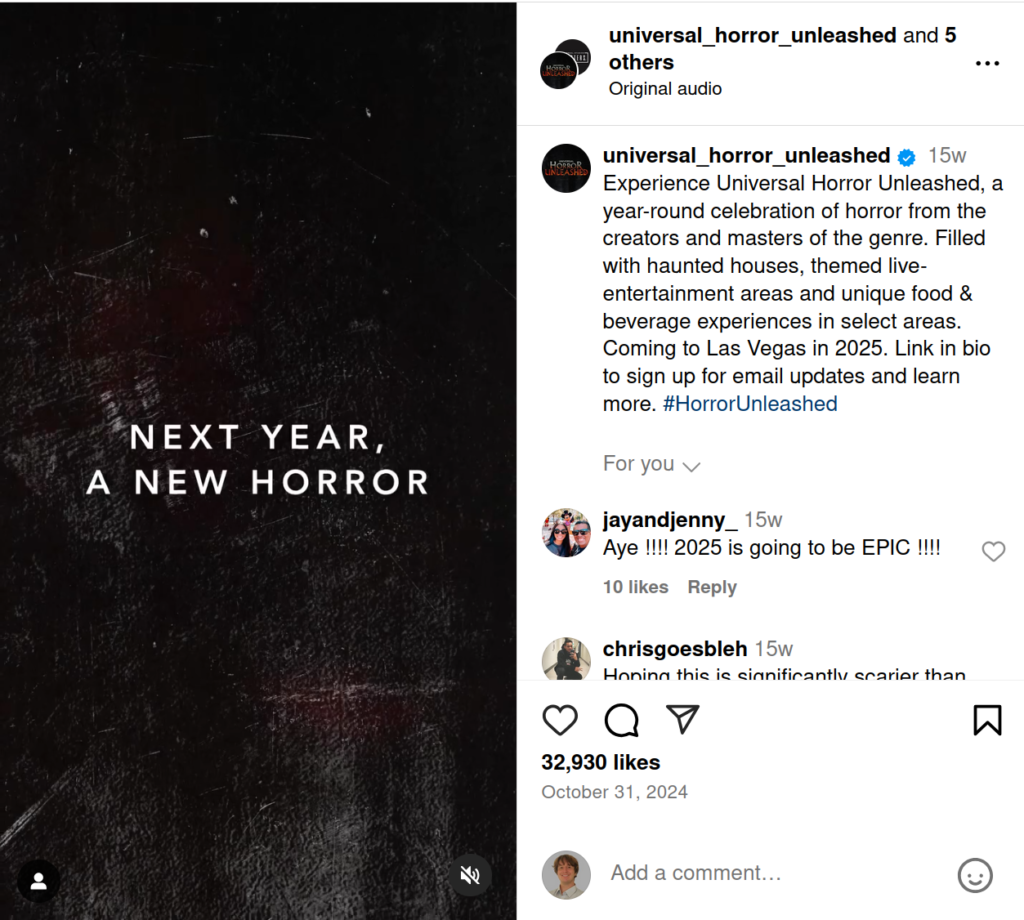
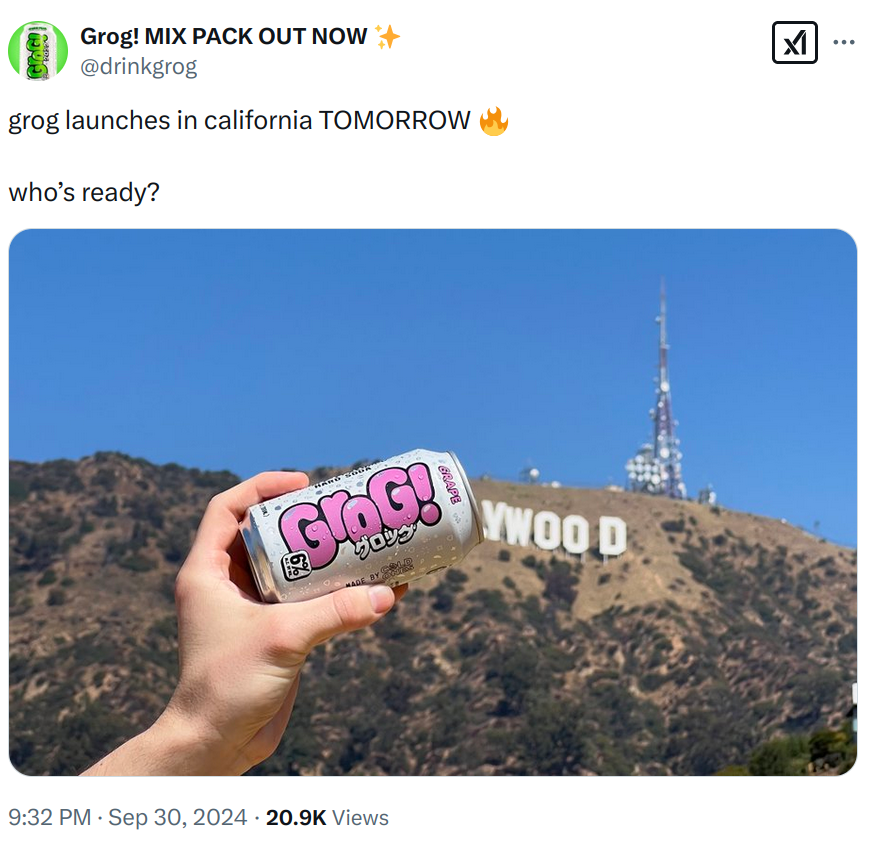
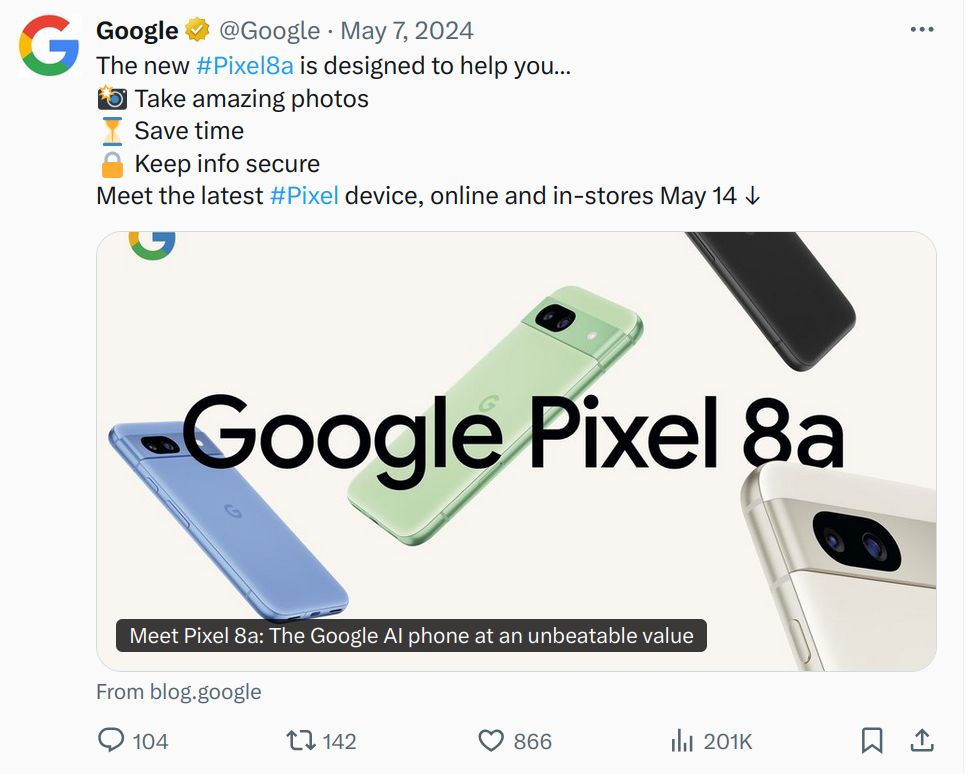
Your reveal can take different approaches:
- Go mysterious with stark visuals and minimal text
- Showcase your product with professional photography and detailed specs
- Keep it playful with location-specific shots that tell a story.
What matters is matching your announcement style to your brand voice and what you’re revealing.
Strong visuals are essential for announcement posts, but they need to be more polished and definitive than your teaser content. Look for bold typography, clean compositions, and professional product imagery. Your visuals should convey that this is a significant moment worth paying attention to.
These announcements work best when your news represents a significant milestone. For example, a product launch or a major update.
Make your reveal posts count by focusing on what matters: clear communication and strong visuals.
Your audience should understand what you’re announcing and why it matters to them within seconds of seeing the post. Skip the industry jargon and speak directly about the value you’re bringing.
Spotlight & Showcase Posts
Ever notice how some brands make their products look irresistible on social media?
The secret isn’t a bigger budget or better gear. They have mastered the art of telling their story on social media.
With these types of posts, you too can put your product into the spotlight.
Technical showcase
These posts focus on showing your product in its best light while communicating clear value to your audience.

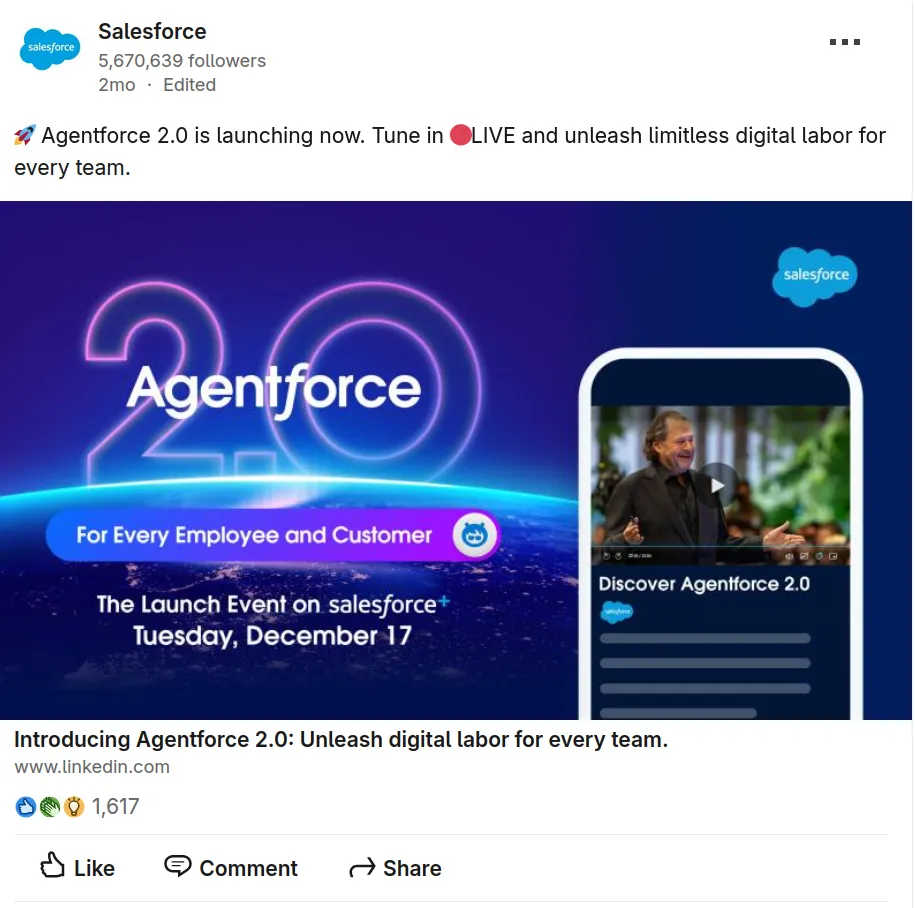

You can approach these type of posts from several angles:
- Feature-focused presentation
- Live demonstration or interactive content
- Visual-heavy showcase using high-quality imagery that highlights your product from multiple angles
- Benefits-first messaging that leads with what matters most to your audience
Try to strike the right balance between features and benefits. Take Tesla’s post as an example. It combines technical improvements (“redesigned exterior with improved aerodynamics”) with user benefits (“better range, performance & longevity”).
Strong visuals make or break these posts. Mix up your shots: show your product in the wild, zoom in on the details, and capture it in action. Each angle tells a different part of your story.
These posts work double duty – they’re perfect for organic reach and can be easily adapted into paid ads. The clear value proposition and strong visuals make them natural candidates for boosted posts or full ad campaigns.
Product showcases work best right after launch or when you’re highlighting new features. They’re especially effective for:
- Physical products that benefit from visual demonstration
- Tech products with new features that solve specific problems
- Services that can be shown through before/after results
- Seasonal items that need timely promotion
B2B tech companies often struggle with Instagram because their product is not visually obvious. The fix: translate abstract capabilities into concrete outcomes. Use carousel posts to walk through a before-and-after workflow, or short Reels showing the product in action with on-screen captions explaining the business impact.
Want to create eye-catching product showcases? Try Piktochart’s AI social media ad generator to create professional-looking visuals in minutes.
Office & facility spotlights
A virtual guided tour of your office or production facility helps you create trust.
Put yourself in your potential customers’ shoes. Wouldn’t you want to see where and how your favorite products come to life?


These posts show the real people, processes, and places that bring your products to life. Which, in turn, humanizes your brand.
You don’t need fancy gear to make these either. A smartphone camera is more than enough to produce an authentic video. In fact, your audience will likely prefer the raw footage, as overproduced videos can come off as fake.
Facility spotlights work particularly well for:
- Product launches or updates where you can showcase new equipment or processes
- Regular content series like “Factory Friday” that build anticipation and consistent engagement
- Special events or limited-time tour opportunities
Focus on telling stories through details that matter to your audience.
Is it the people there? The sustainable practices? The innovative technology?
Let these elements guide your narrative.
Remember to space out your facility content strategically. While major announcements warrant their own spotlight, consider creating a regular cadence with facility updates.
For example, you could offer monthly employee features, weekly production highlights, or quarterly virtual tours.
Client success stories
These posts share the successes you’ve gotten for your clients.
While these posts might not rack up thousands of likes, they serve as powerful social proof for potential customers actually considering your services.
This strategy works particularly well for service-based businesses, from agencies and consultants to B2B providers.


The key to effective client success posts is focusing on concrete results. Whether it’s highlighting specific metrics (like transaction volumes or revenue growth) or sharing transformation stories, potential clients want to see tangible outcomes.
Keep these posts simple and data-focused, letting the results speak for themselves.
You can approach client success stories in two ways:
- Direct metrics showcase: Feature a bold statistic or achievement with minimal commentary
- Narrative approach: Have your team share their favorite client transformation stories
Remember to include clear calls-to-action in these posts.
Unlike viral content that aims for broad engagement, success stories target serious prospects who are evaluating your services.
Make it easy for them to take the next step, whether that’s booking a call or requesting more information.
These posts are perfect for saving and sharing during sales conversations. Consider them part of your conversion toolkit rather than your viral content strategy.
Educational Content
You can’t go wrong with educational content.
When done right, it positions your brand as an industry expert while providing genuine value to your audience.
Visual guides & breakdowns
Complex information doesn’t have to be boring or confusing.
Visual guides transform dense data and multi-step processes into clear, engaging content.
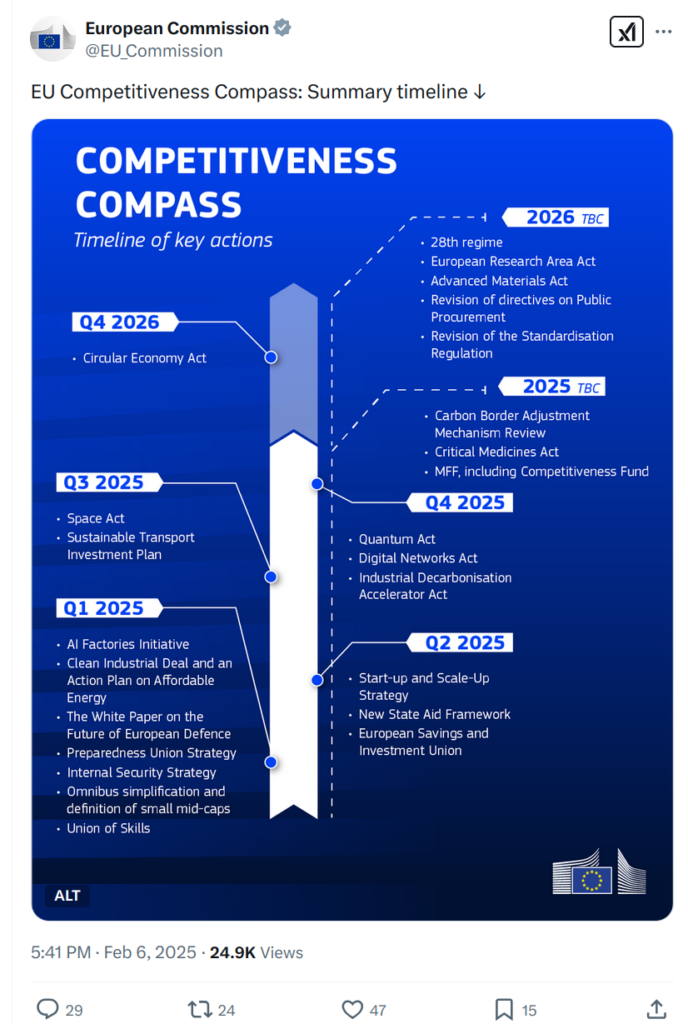


The power of visual breakdowns lies in their ability to stop people from scrolling.
If you presented the same data via regular text posts, you’d end up with a massive wall of text. Informative, but most people will scroll past it without giving it as much as 3 seconds of attention.
With a properly designed fact sheet or infographic, however, you can grab someone’s attention much more easily.
These posts work particularly well for:
- Breaking down industry reports and data
- Explaining complex processes or workflows
- Highlighting key trends or patterns
- Making statistical information more digestible
Keep in mind the golden rule for visual posts: use a clean design and let the information breathe. Visual breakdowns work best when they focus on clarity over complexity.
If you feel like making cool visuals is reserved to expert designers, think again. With our AI social media infographic generator, you too can design captivating visuals. Even if you have never dabbled in design before.
AI tools are reshaping how brands create social media content in 2026. Beyond design tools like Piktochart’s AI post generator, brands are using AI to generate caption variations, repurpose long-form content into platform-specific formats, and create on-brand meme templates at scale. The key is treating AI as a drafting partner, not a replacement for your brand voice.
Infographic Posts: Data Storytelling in a Single Scroll
An infographic on social media works like a billboard on a highway: you have three seconds to communicate something worth remembering. The brands winning with infographic posts in 2026 treat each one as a self-contained story, not a dumbed-down version of a report.
Why infographics outperform on social feeds
Static images get shared at higher rates than text posts on LinkedIn, and infographics are among the most saved content types on Instagram. The reason is simple: they compress value. A 2,000-word blog post becomes a single carousel slide. A quarterly earnings summary becomes a shareable graphic your audience sends to their team Slack channel.
Formats to try
Data comparison posts work well for B2B accounts. Salesforce regularly publishes side-by-side stat graphics comparing CRM adoption rates, and those posts consistently outperform their standard product content. Step-by-step process infographics are another high performer; HubSpot’s “How to Build a Sales Pipeline” infographic earned thousands of repins on Pinterest because it gave readers a complete framework in one visual.
For brands with less data to draw from, try the “Did You Know?” format. Pull a single surprising statistic from your industry and design it as a bold, shareable graphic. Piktochart offers infographic templates built for social dimensions, so you do not need a designer on staff to produce professional-quality visuals.
Making infographics work harder
Repurpose each infographic across platforms. A vertical format for Instagram Stories, a square crop for LinkedIn, and a horizontal version for X. With an infographic maker like Piktochart, you can resize a single design for every channel in under a minute. If you are new to the format, our guide on how to make an infographic walks through the entire process from data selection to publishing.
The brands getting the most traction from this format are not designing infographics as afterthoughts. They are building them as lead content: the piece their audience sees first, saves, and shares before reading a single word of the blog post it came from.
Quick tips & expert insights
Now that AI use has become widespread, audiences crave digestible wisdom from trusted sources.
Quick tips and expert insights prove you have skin in the game. When you combine authority with accessibility, you create content that busy professionals can immediately apply to stay ahead of the curve.


These posts succeed by transforming complex expertise into scannable, actionable content. The idea here is that the same posts in text form would get skipped. Crisp visuals have a higher likelihood of making people stop and read your post.
Carousel and slide formats work particularly well for this content type. Use them to break down multiple tips into digestible chunks. Pair it with bold typography and a clear design hierarchy, and you have a true scroll-stopper.
Quick tip posts excel in dynamic industries like tech, marketing, and design where best practices evolve rapidly.
They’re particularly effective when you need to:
- Demonstrate your ongoing expertise in fast-changing fields
- Share timely insights about industry updates or trends
- Build trust with your audience by consistently delivering practical value
Any business, no matter their size, can benefit from this type of posts. As long as you focus on delivering real knowledge, and not regurgitated information, you’ll grow an audience.
Use these posts when you spot emerging trends, after attending major industry events, or when you notice your audience struggling with specific challenges.
Making a carousel from scratch takes lots of work, which is why we created an AI carousel maker. Simply type in your topic, and we’ll generate a carousel for you.
Behind-the-scenes insights
Industry data is hardly a secret. Raw behind-the-scenes footage, however, is often unknown among people. These posts give your audience exclusive peeks into processes they rarely get to see.


Think of behind-the-scenes content like a documentary. Your audience might already know the final product, but they’re curious about the journey.
Behind-the-scenes content humanizes your brand while satisfying curiosity. You also get to showcase the brilliance behind your shots.
These posts work by turning everyday processes into engaging narratives. You’ll make your audience part of your journey.
If your footage is authentic and personal, people will relate to it. Even if the subject isn’t particularly exciting (like a podcast setup), showing the human element behind it can create engagement.
Focus on moments that matter to your audience. Rather than showing every detail, highlight the parts that tell a story. Things like the creative decisions and the unexpected challenges will make the audience realize you run into problems just like them.
Remember to maintain a balance between professionalism and authenticity. A food creator showing their baking process step-by-step, for instance, can combine polished photography with real hands-on moments. This mix of quality and relatability helps your audience connect with both the process and the person behind it.
Need help structuring your behind-the-scenes story? Start by identifying what fascinates you about your own process. Whether it’s a 4AM bakery routine or a complex filming setup, if you find it interesting, chances are your audience will too.
Platform Format Performance: LinkedIn Text vs. Image Posts
LinkedIn’s algorithm treats text-only posts and image posts differently, and understanding the distinction can sharpen your content calendar. Text-only posts tend to generate higher comment rates because LinkedIn’s feed prioritizes posts sparking conversation; a strong opening hook followed by a personal insight or contrarian opinion invites replies. Image posts, by contrast, earn more impressions on average because the visual element occupies more feed real estate and stops the scroll.
When to use each format: choose text-only for thought leadership, career reflections, and opinion-driven posts where the words carry the argument. Choose image posts for data visualizations, event recaps, and step-by-step frameworks where a visual adds clarity the text alone cannot deliver.
Two examples of high-performing text posts: a founder sharing the three hiring mistakes made in year one (personal narrative, strong hook, actionable lessons) and a marketer posting a single contrarian statement (“Cold outreach on LinkedIn is dead”) with a three-paragraph defense beneath it. Both formats thrive because they provoke a reaction and invite the reader to weigh in.
For LinkedIn specifically, carousels (uploaded as PDF documents) combine the strengths of both formats; they are visual, swipeable, and algorithmically favored because each swipe counts as engagement.
Community-Building Posts
Community is a bit of a buzzword in the world of brand building. But its positive effects are undeniable.
For example, look through forums where people talk about GPUs (Graphical Processing Units) for their PCs. You’ll find plenty of reference to “joining team red” (for AMD) or “team green” (Nvidia).
People who buy from either company want to feel part of a team. Community building posts tap into this desire.
Polls & surveys
Want to spark conversation while gaining valuable insights? Polls and surveys are a quick and interactive way to engage your audience.
These posts work because they invite participation with minimal effort. All it takes is a simple click or short response.


You can make a poll on all major social media platforms. LinkedIn, X/Twitter, Instagram Stories, and even YouTube Community posts all let you poll your audience.
Want to get started with polls? Try out one of those:
- Industry Insights – Ask about trends, challenges, or predictions. Example: “Which emerging tech trend excites you the most? AI, Blockchain, AR/VR, or 5G?”
- Product Feedback – Let your audience help shape your offerings. Example: “Which feature would you love to see next?”
- Fun & Engaging – Lighthearted polls boost interactions. Example: “Pineapple on pizza: Yes or no?”
- “Would You Rather” Scenarios – Great for sparking discussion. Example: “Would you rather work 4-day weeks or get unlimited PTO?”
Instagram Stories are particularly effective for polls and quizzes because the interactive stickers (poll, quiz, slider, and question stickers) appear inline as users tap through. For example, a skincare brand might run a “Which ingredient does more for acne?” quiz sticker, followed by a product recommendation slide based on the answer.
Polls make your audience feel heard while giving you direct feedback.
User-generated content spotlights
User-generated content (UGC) is one of the most effective creative strategies a brand can adopt. Here are examples of brands using UGC in ways going beyond a simple repost; turning customer contributions into full-scale campaigns.
Sometimes, your users will do the work for you. User-generated content (UGC) authentic marketing tool in your arsenal.
The best UGC feels natural. It’s not staged or overly polished. It shows products in action, captures genuine reactions, and highlights brand loyalty in a way that resonates. A well-timed reshare can strengthen trust, encourage more engagement, and even spark trends.


UGC ticks all the boxes of great marketing; it amplifies word-of-mouth marketing and demonstrates genuine customer love for your product.
You can sing your own praises all you want. Nothing beats the trust fostered by UGC.
Social proof? Check.
Real people buying and using your product? Check.
You showing that you care about people enjoying themselves with your product? Also check.
The key is to encourage and amplify it. You can pick a brand hashtag to make it easy for users to share their posts. Reshare content quickly to show appreciation.
You can also create challenges or prompts to encourage users to post more.
UGC creates a virtuous circle. The more visible it becomes, the more people want to join in.
Beyond engagement, UGC fuels your content strategy. A single user-generated post going viral could create a cascading effect, drawing in more creators, expanding your reach, and reinforcing brand credibility.
Each share strengthens the cycle, turning happy customers into your most persuasive marketers.
Lean into it, and let your audience help tell your story.
Community co-creation initiatives
People want to feel part of something bigger.
Co-creation turns your audience into collaborators, giving them a voice in your brand’s direction.
Whether it’s voting on a new product, submitting ideas, or shaping an event, these initiatives make customers feel valued and involved.
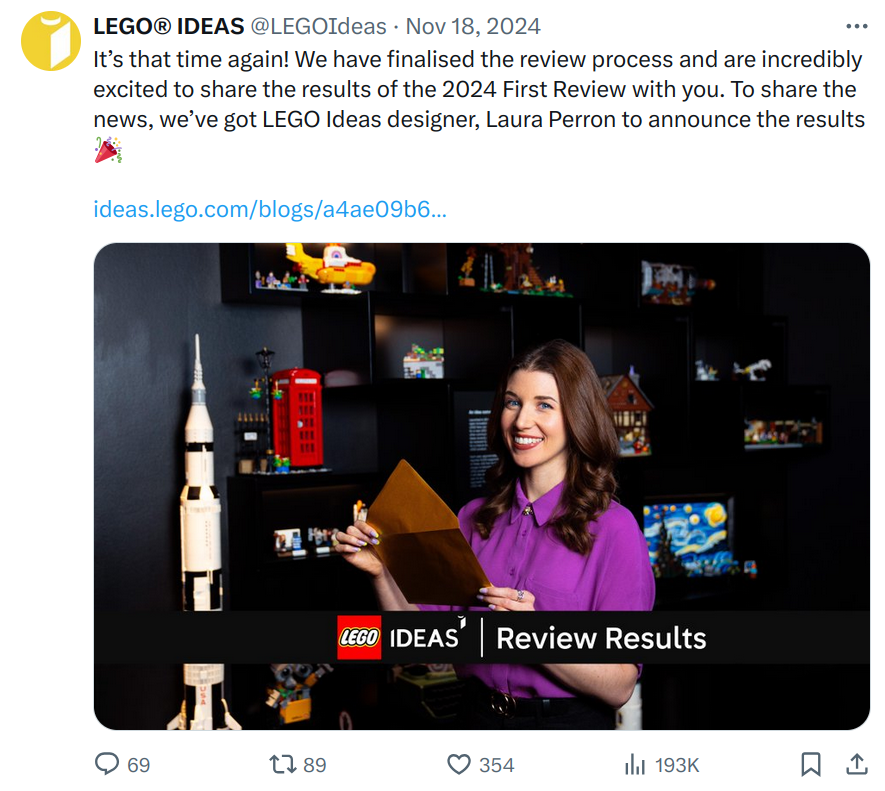

The key to a successful co-creation effort is making contributions feel meaningful.
A simple vote on a new flavor, color, or feature can generate excitement. But try to go deeper. Involve your audience in designing limited-edition products or shaping an event lineup.
When people see their input reflected in a real outcome, they don’t just support the result; they take pride in it.
Collaboration also builds momentum. When users take part in them, they share. They post about their involvement, encourage friends to join, and celebrate when their choices make an impact.
This fuels organic growth, turning a single engagement opportunity into a full-blown movement.
But co-creation, much like user-generated content, only works when it’s genuine. If a brand asks for input but ignores it, or stages participation just for marketing, audiences will tune out.
The best initiatives highlight real contributions, credit participants, and follow through with transparency. Let the community see their fingerprints on the final result, and they’ll keep showing up.
When done right, co-creation transforms casual customers into dedicated advocates. It’s not just engagement—it’s buy-in. Give people the opportunity to shape your brand, and they’ll stick with you for the long haul.
Contests, Giveaways and Interactive Challenges
Few post types generate follower growth as fast as a well-run contest. When you ask your audience to tag a friend, share a post, or submit their own content for a chance to win, you turn passive followers into active promoters; every entry widens your reach organically.
How brands use contests on social media:
- Tag-to-win giveaways. Skincare brand Glossier regularly runs “tag two friends” giveaways on Instagram, generating thousands of comments per post. The mechanic is simple: follow the account, tag friends in the comments, and wait for a random draw. The result is a spike in both engagement and new followers.
- Branded hashtag challenges. Chipotle’s #GuacDance challenge on TikTok asked users to show off their best avocado-themed dance moves. The campaign earned over 250,000 video submissions and 430 million video starts in six days. Hashtag challenges work because they give participants a creative prompt while associating their content with your brand.
- Photo or video submission contests. GoPro’s ongoing #GoProAwards invites users to submit their best footage for cash prizes. Every submission doubles as user-generated content the brand can repurpose across channels.
- Interactive story challenges. Use Instagram Stories or TikTok to run quick 24-hour challenges: “Show us your desk setup” or “Film your morning routine.” The time limit creates urgency while the low barrier to entry drives high participation.
When planning your next contest, keep the rules clear and the entry mechanic as frictionless as possible. One required action (follow + comment) converts better than three. You can design your contest graphics in minutes using templates built for social dimensions.
Reactive & Trend-Based Content
Social media moves fast, and brands that stay agile can reap big rewards.
You can tap into trending topics and viral moments to join the discussion—provided you do it tastefully.
Think of it like surfing: catch the right wave at the right time, and you’ll ride a surge of engagement. Miss it, and the moment passes.
Trendjacking: Riding the Wave of Virality
Trendjacking means participating in popular conversations and moments that align with your brand.
Major companies make headlines with their trend-based content. But you don’t need to be a big company to enjoy the same benefits. The halo effect can be enough to reach a couple key accounts.
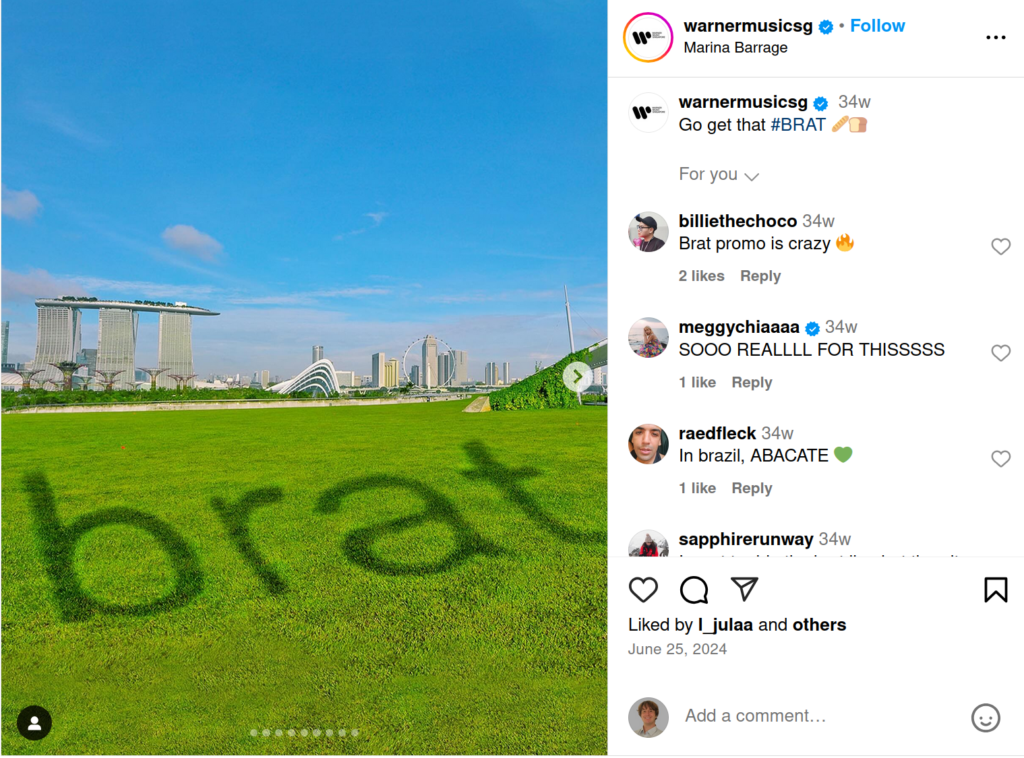

Your main consideration should be chasing trends that make sense for your brand. You will see gigantic brands like Wendys chase every single trend. That’s okay when you’re a national chain, but local businesses need to be more selective.
If you want to get into the trends game, start by looking for moments that connect with your business. Things like cultural events and movie premieres can give you a slew of ideas.
For a real-world example, take Dune: Part Two’s release in early 2024. Local bookstores highlighted their sci-fi collections, and coffee shops created spice-inspired drinks. Even tech companies referenced the film’s themes of innovation and progress in their content.
Success in trendjacking comes down to relevancy and timing. Keep tabs on what’s happening in your industry and local area. Don’t feel pressured to jump on every viral moment. Nothing screams “insincere” more than random self-inserts.
It’s better to execute well one trend out of 10 than to chase every viral moment with mediocre content.
Above all, maintain your brand’s voice even when participating in trends. Your audience should still recognize you, even when you’re joining a larger conversation.
Timely Reactions: News & Industry Updates
When major events unfold or industry news breaks, your audience is already part of the conversation. Smart brands know how to join in authentically.
These posts show you’re aware and engaged with what matters to your audience, whether it’s a global awards show or an important industry development.


The best reactive posts feel natural, not forced, and add something meaningful to the broader conversation.
These posts work particularly well for:
- Industry milestones and achievements
- Cultural moments that align with your brand values
- Awareness days relevant to your audience
- Major events where your brand has a natural connection
Timing is crucial. You need to be quick enough to join the conversation while it’s happening, but thoughtful enough to add value rather than just noise. A delayed response can miss the moment, while a rushed one might miss the mark.
Witty and Humorous Posts on X
X (formerly Twitter) rewards brevity, speed, and sharp wit. The platform’s text-first format means a clever one-liner can outperform a polished graphic, and brands capable of matching the conversational tone of the timeline earn outsized engagement.
Wendy’s pioneered the brand-roast reply format, responding to competitor mentions and customer questions with deadpan humor. Their account proved large corporations could sound human on social media without sacrificing brand equity. The key to their success: a small, empowered social team with short approval chains and a deep understanding of internet culture.
Duolingo’s unhinged persona on X leans into absurdist comedy. The owl mascot threatens users about missed lessons, flirts with other brand accounts, and posts surreal observations unrelated to language learning. The strategy works because it is consistent; followers anticipate and share the chaos, driving organic reach far beyond what a straightforward product post could achieve.
Ryanair takes a different angle: self-deprecating humor about its own budget airline reputation. By joking about legroom, baggage fees, and airport experiences before customers do, Ryanair disarms criticism and converts complaints into shareable moments. Their X posts frequently clear 10,000+ likes with zero media spend.
Brand Strategy Breakdown: Duolingo vs. Ryanair
Both brands rely on humor, yet their strategies differ in tone, platform focus, and risk profile. Comparing them side by side reveals lessons any brand can borrow.
Duolingo’s humor is absurdist and character-driven. The owl mascot operates as a fictional personality with its own storylines, crushes, and feuds. The brand posts most aggressively on TikTok and X, where short-form chaos performs well. A representative example: a TikTok showing the Duolingo owl “stalking” a user who missed a lesson, captioned with mock-threatening language. The risk is low because the humor is clearly fictional; nobody takes a cartoon owl seriously.
Ryanair’s humor is observational and self-aware. The brand does not hide behind a character; it speaks as Ryanair, openly acknowledging its reputation. On X, Ryanair replies to customer complaints with quips like “You paid 9.99 for a flight and expected a spa?” On TikTok, the brand overlays its logo onto trending audio clips, often poking fun at itself. The tone works because Ryanair’s audience already expects a no-frills experience; the humor confirms the brand identity rather than contradicting it.
What other brands can learn: Duolingo’s model suits companies willing to create a distinct social-media persona separate from their corporate identity. Ryanair’s model suits brands confident enough to own their weaknesses publicly. Both approaches require fast internal approvals and a social team trusted to publish without multi-layer sign-off.
A warning for brands considering this approach: humor on X sits on a razor’s edge. A joke landing badly can generate negative press within hours. Audit your brand’s risk tolerance before committing to an unhinged voice, and set internal guidelines for topics your social team should never joke about.
Meme & Pop Culture Adaptations
Memes and pop culture moments give brands a chance to show their playful side.
We picked examples from massive brands, but the same principles apply to yours too.
In fact, these titans pulling it off so effortlessly shows how simple it can be. Big brands have to navigate layers of approval and corporate guidelines. You can be more agile.


The key to success with memes and pop culture references is relevancy. Think about what makes sense for your business.
A local pet shop can join pet-related trends. A neighborhood café can riff on food memes. Even B2B companies can have fun with industry-specific jokes and references.
Sometimes the best opportunities come from addressing common misconceptions about your business.
Say you run a Mediterranean restaurant that people keep mistaking for an Italian place. You could post a playful “We are NOT an Italian restaurant” series, featuring humorous comparisons between Mediterranean and Italian cuisine.
Turn confusion into entertainment. Make your audience smile while setting the record straight.
Even tech-heavy or serious industries can approach social media with humor. The goal is to take part in these moments in a way that feels natural for your brand.
The beauty of meme marketing is that it doesn’t need a big budget or professional design team. It’s more about timing and personality than production value. The golden rule: if you’re going to meme, make it meaningful to your brand and audience.
Restaurants are natural fits for creative social media. A local cafe can turn its daily specials board into a recurring Instagram carousel, use TikTok to film 15-second plating sequences, or run a poll asking followers to vote on next week’s featured dish. Food content is inherently visual and shareable; the key is showing process, not the finished plate alone.
And if you need to polish your visuals a bit, tools like our social media post generator can help you create a robust starting point.
Stay the course to gain momentum
No matter what you’re after, consistency and patience are your strategy’s pillars.
The ideas we’ve explored here give you a solid foundation to work from. But what matters most isn’t copying these examples exactly.
You need to understand the principles behind them and adapt to them. Some brands can get away with posting more aggressive content. Others do better by playing more meek.
It all depends on the message you want to send. Also, while you have an audience, you don’t know how they’d react to certain messages.
What makes a social media post stand out in 2026 comes down to three things: visual clarity stopping the scroll, authentic voice building trust, and participatory formats inviting the audience in rather than talking at them.
Keep experimenting, stay authentic, and trust that your sustained effort will build the momentum your brand deserves.