On March 24, 2026, OpenAI announced that it would be shutting down Sora. The AI video platform reportedly cost $15 million per day to run and made just $2.1 million in total revenue. Clearly, the economics weren’t working out!
This means the iOS app, Sora.com, the API, and video generation in ChatGPT will wind down and be sunsetted in the not too distant future. If you’ve been using Sora for AI video generation, you’ll need a new tool now.
To save you some time in your search, we found 10 alternatives. Here are the best options depending on your use case and budget.

Quick Comparison
| Tool | Best For | Price | Max Res | Duration | Free Tier |
| Runway | Pro creators + editing | $12/mo | 4K | 10s | Limited |
| Kling AI 3.0 | Realistic motion on a budget | $6.99/mo | 4K 60fps | 15s | Yes (daily) |
| Google Veo 3.1 | Best audio + video quality | $7.99/mo | 4K 60fps | 10s | Limited |
| Seedance 2.0 | Multi-shot storytelling | $18/mo | 1080p | 15s | Yes (daily) |
| Pika | Stylized creative effects | $8/mo | 1080p | 5s | Yes |
| Luma AI | Long sequences + multi-model | $25/mo | 4K | 15s | Trial |
| HeyGen | Talking head + multilingual | $24/mo | 4K | 60 min | Yes (3 videos) |
| Synthesia | Enterprise training + corporate | $18/mo | 1080p | 10 min | Yes (3 min) |
| InVideo AI | Full video assembly + long-form | $20/mo | 4K | 30 min | Yes (10 videos) |
| Wan 2.6 | Developers + self-hosting | Free | 4K | 15s | Open source |
10 Best Sora Alternatives
1. Runway (Gen-4.5) – Best for professional video creators
Runway has been in the AI video space longer than almost anyone, and it shows. The Gen-4 and Gen-4.5 models produce consistently high-quality output. But the real reason Runway leads this list is Aleph, a post-generation editor that lets you tweak clips with text prompts after they’re created. No other tool offers this.
Want to add rain to a scene? Change a character’s outfit? Adjust camera movement? Aleph handles it without regenerating the entire clip. If you’ve ever burned through credits re-rolling the same prompt 15 times, that alone justifies the subscription.
Key features:
- Gen-4.5 (text-to-video) and Gen-4 Turbo (fast image-to-video)
- Aleph post-generation editing: change scenes, add elements, or adjust motion via text prompts
- Act-Two performance capture for transferring facial expressions to generated characters
- 4K and ProRes export on Pro plan and above
Pricing: Free (125 one-time credits) | Standard $12/mo | Pro $28/mo | Unlimited $76/mo (annual)
The Unlimited plan includes Explore Mode – genuine unlimited generation at relaxed speed. Worth it if you’re producing video content regularly.
Pros:
- Best editing capabilities in the market
- Widest feature set overall
- Explore Mode offers genuinely unlimited generation
Cons:
- Free tier doesn’t refresh – 125 credits and done
- Credit costs vary wildly across models
- 10-second max per clip
2. Kling AI 3.0 – Best for realistic motion on a budget
If you watch AI-generated video closely, motion is usually where the illusion breaks. People walk like they’re on a ship. Objects float when they should fall. Kling AI’s Omni One physics engine actually models gravity, balance, and inertia where you can really feel and see the difference.
It’s also the cheapest paid option on this list at $6.99/mo. For creators on a tight budget who care about quality motion, nothing else comes close at this price.
Key features:
- Physics-aware motion simulation (gravity, deformation, inertia)
- Motion Brush for drawing custom motion paths
- Multi-shot sequences with character consistency at 4K 60fps
- Native lip-sync and audio generation
Pricing: Free (66 credits/day) | Standard $6.99/mo | Pro $29.99/mo | Ultra $59.99/mo
The free tier is the most generous here. You get 66 credits daily, which is enough for 2-3 standard 10-second clips per day. While credits don’t roll over, they refresh every day.
Pros:
- Most generous free tier with daily refresh
- Best physics simulation
- $6.99/mo entry is unbeatable
Cons:
- Free tier locked to 720p with watermark
- Daily credits can’t be saved up
- UI is less polished than Runway or Pika
3. Google Veo 3.1 – Best audio + video quality
Veo 3.1 is Google’s flagship video model, and its main selling point is native spatial audio generation. It creates 3D soundscapes, dialogue, and ambient sound automatically, synced to what’s happening on screen. This means you don’t need to spend time or money on separate audio production.
Also, the video quality at 4K is broadcast-grade, which results in some gorgeous-looking content. If you’re making content for YouTube Shorts or TikTok, the native 9:16 vertical video support saves you from awkward cropping.
Key features:
- Native spatial audio generation (dialogue, SFX, ambient sound)
- True 4K at 3840×2160 up to 60fps on Ultra plan
- Native 9:16 vertical video for TikTok and YouTube Shorts
- Enhanced character consistency across multi-scene generations
Pricing: AI Plus $7.99/mo (720p) | AI Pro $19.99/mo (1080p) | AI Ultra $249.99/mo (4K)
The catch: 4K requires the $249.99/mo Ultra plan. That’s a massive jump from the $19.99 Pro tier. For most creators, 1080p on the Pro plan is the sweet spot.
Also, there’s a geo-restriction in place. Veo 3.1 is currently only available on Google’s native platforms in the U.S.
But the good news is if you’re outside supported regions, you can access it via Pikto AI.
[Insert CTA to sign up for Veo 3.1]
Pros:
- Best audio generation of any tool
- True 4K output without upscaling artifacts
- $7.99/mo entry is accessible
Cons:
- 4K requires the $249.99/mo Ultra plan
- Tightly coupled to Google’s ecosystem
- API pricing adds up fast at volume
4. Seedance 2.0 – Best for multi-shot storytelling
Most AI video tools generate isolated clips. Seedance 2.0, built by ByteDance, takes a different approach. It generates audio and video together in a single pass and maintains character and scene consistency across multiple shots from one prompt.
If you need a sequence where the same character appears in different scenes with matching lighting and props, Seedance handles this natively. Think short films, not just 10-second clips.
Key features:
- Unified audio-video joint generation (dialogue, ambient sound, SFX synced frame-by-frame)
- Multi-shot storytelling with character and scene consistency
- Phoneme-level lip synchronization
- Available through Dreamina (international platform)
Pricing: Free (daily credits) | Basic $18/mo | Standard $42/mo | Advanced $84/mo
The free tier gives ~225 daily tokens on Dreamina. That’s enough for 2-3 short clips per day. But those credits are shared across all Dreamina tools.
Pros:
- Audio-video joint generation rivals Veo 3.1
- Multi-shot consistency is excellent
- Generous daily free credits
Cons:
- Credits shared across all Dreamina tools
- Max 1080p – no 4K option
- Platform split between Dreamina and Jimeng can be confusing
5. Pika – Best for creative stylized effects
Pika doesn’t try to compete on realism. Instead, it leans into creative effects that no other tool matches. The Pika suite of tools (Pikaffects, Pikaswaps, Pikascenes) allows users to produce distinctive stylized output that stands out on social media.
Key features:
- Pika 2.5 model with creative effect tools (Pikaffects, Pikaswaps, Pikascenes, Pikatwists)
- Text-to-video, image-to-video, and video modification
- Credit rollover on paid plans
- Commercial use on all paid plans
Pricing: Free (80 credits/mo) | Basic $8/mo | Pro $28/mo | Fancy $76/mo
At $8/mo, the Basic plan is one of the most affordable paid tiers available. Credits roll over, which is unusual and valuable.
Pros:
- Unique creative effects that no other competitor offers
- $8/mo entry with credit rollover
- Strong for stylized social content
Cons:
- 5-second max per generation – the shortest in this list
- Free tier is 480p and unusable beyond testing
- Credit costs vary by feature
6. Luma AI (Dream Machine) – Best for building long sequences
Every other tool on this list maxes out at 10-15 seconds per generation. Luma AI’s extension feature lets you chain clips into sequences up to five minutes long. If you’re building narratives, not just clips, that matters.
Luma also offers multi-model access. You can compare outputs from different AI engines within the same platform. Useful for finding the right model for each scene.
Key features:
- Ray2 model for cinematic 1080p video with 4K upscaling
- Video extension to build sequences up to 5+ minutes
- Access to multiple AI models within one platform
- Luma Agents for automated multi-step creative workflows
Pricing: Free (trial) | Plus $25/mo | Pro $75/mo | Ultra $250/mo (annual)
Luma is more expensive than most competitors. The Plus plan at $25/mo is the minimum for real work.
Pros:
- Extension feature enables long sequences
- Multi-model access is unique
- Agent workflows automate complex tasks
Cons:
- Higher pricing than competitors ($25/mo minimum)
- Free tier details are vague
- Credit costs hard to predict
7. HeyGen – Best for talking-head and multilingual video
HeyGen isn’t a general-purpose AI video generator, and it doesn’t pretend to be. It’s built specifically for avatar-based talking-head videos.
Where HeyGen pulls ahead is multilingual content. The AI dubbing lip-syncs translated audio across 120+ languages, matching mouth movement to the new language in each frame. Record once, publish in 120 languages with matched lip movement.
Key features:
- 500+ stock AI avatars with custom avatar creation
- 1,000+ AI voices in 40+ languages with voice cloning
- AI dubbing with lip-synced translation in 120+ languages
- Unlimited standard avatar video creation on Creator plan
Pricing: Free (3 videos/mo) | Creator $24/mo | Business $149/mo
Pros:
- Best avatar quality and variety
- Unlimited standard avatar videos on Creator plan.
- 120+ language lip-synced dubbing
Cons:
- Not a general-purpose video generator – avatar/talking-head only
- Advanced features cost extra via Premium Credits
- Business plan jumps to $149/mo
8. Synthesia – Best for enterprise training and corporate video
Synthesia is HeyGen’s enterprise cousin. Same concept (AI avatars delivering content), but purpose-built for corporate environments: training modules, onboarding, internal communications. The 250+ business templates and PowerPoint-to-video converter make it the fastest path from “we need a training video” to “it’s done.”
Key features:
- 240+ AI avatars with custom personal avatar creation
- 400+ voices in 140+ languages
- 250+ business templates (HR, training, presentations)
- PowerPoint-to-video conversion
Pricing: Free (3 min/mo) | Starter $18/mo | Creator $64/mo | Enterprise: custom (annual)
Pros:
- Purpose-built for enterprise video at scale
- Largest business template library (250+)
- $18/mo Starter is competitive
Cons:
- Strictly avatar-based – not for creative or cinematic video
- Max 1080p
- Video minutes are limited on Starter (10 min/mo)
9. InVideo AI – Best for full video assembly and long-form content
InVideo AI is different from every other tool on this list, insofar that it doesn’t generate visuals from scratch. Instead, it assembles complete videos from 16M+ premium stock assets, AI voiceover, and music – all from a single text prompt. The result is polished, ready-to-publish videos up to 30 minutes long.
Think of it as “AI video assembly” rather than “AI video generation.” If you need YouTube shorts, marketing videos, or social posts where premium stock footage works, InVideo AI is the fastest path from idea to finished video.
Key features:
- Full video creation from text prompts (script, voiceover, footage, music)
- 16M+ premium royalty-free stock assets (iStock, Shutterstock, Storyblocks)
- Access to 200+ AI models, including Veo 3.1 and Kling 3.0
- Conversational editing interface for refining generated videos
Pricing: Free (10 videos/mo at 720p) | Plus $20/mo | Max $48/mo (annual)
Important distinction: InVideo AI is more “AI video assembly” than “AI video generation.” It’s ideal for YouTube content, marketing videos, and social posts where stock footage works.
Pros:
- 30-minute videos from a single prompt
- 16M+ premium stock library included
- Best for long-form content creators
Cons:
- Relies on stock footage, not AI-generated visuals
- Quality depends heavily on prompt refinement
- Watermarked at 720p on free tier
10. Wan 2.6 – Best for developers and self-hosting
Wan 2.6 is Alibaba’s open-source AI video model, released under Apache 2.0. It’s the only tool on this list you can download, modify, and deploy on your own infrastructure with zero licensing fees. For developers and teams with GPU resources, it’s the most cost-effective option at scale.
Key features:
- Open source (Apache 2.0) – download, fine-tune, and deploy commercially
- 14 billion parameter Mixture-of-Experts architecture
- Multi-shot sequences with character consistency
- Native lip synchronization and audio generation
Pricing: Free (self-hosted) | API via third-party providers: $0.08–$0.16/second
Self-hosting is free but requires significant GPU resources for a 14B parameter model. For most users, API access through third-party providers is more practical.
Pros:
- Truly open source with no vendor lock-in
- Most cost-effective at scale
- Audio lip-sync quality rivals closed-source tools
Cons:
- Self-hosting needs serious GPU power
- Cloud access is fragmented across providers
- 15-second max with no built-in extension feature
How to access Veo 3.1 without geo-restrictions
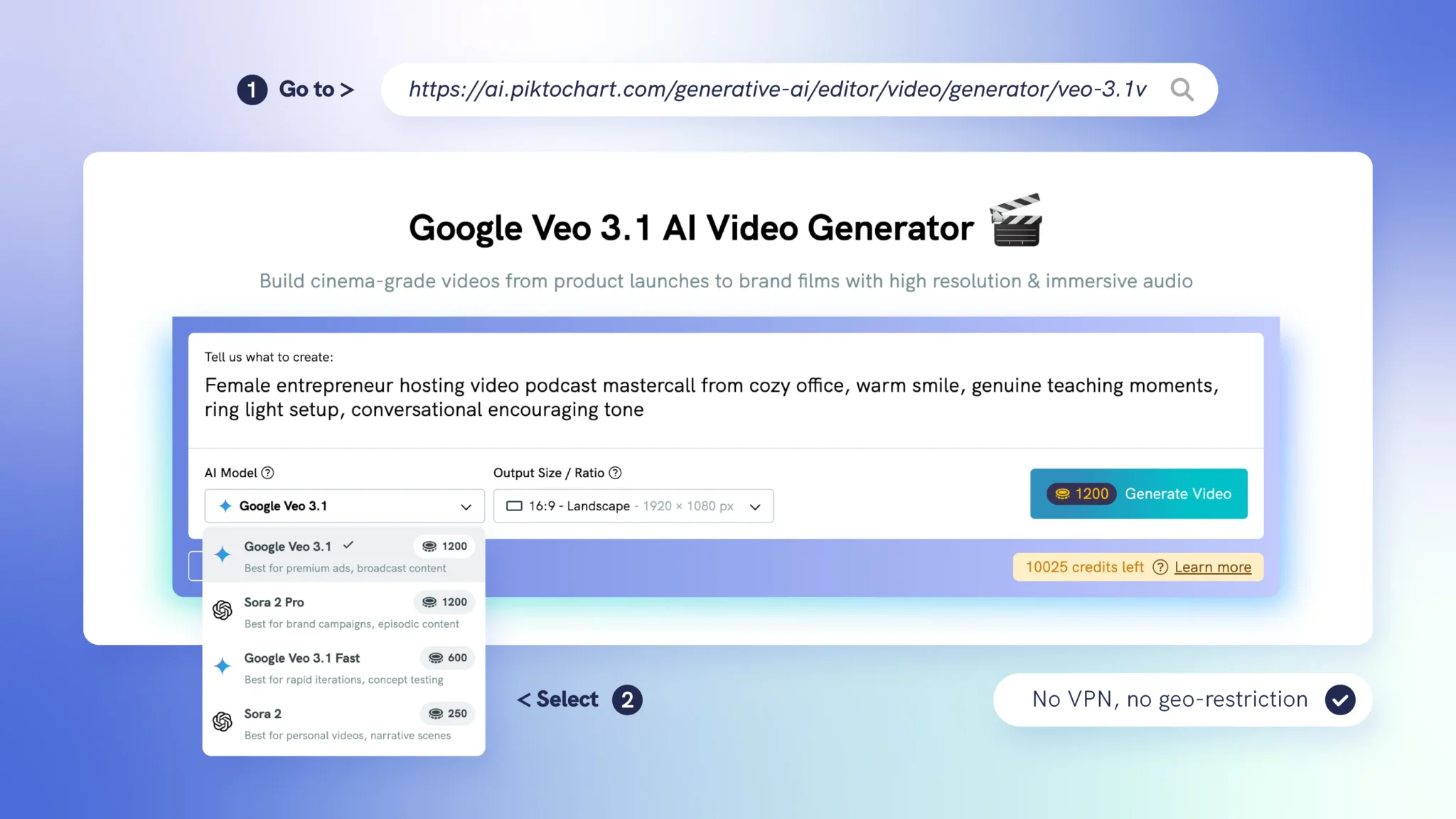
Google Veo 3.1 is one of the best AI video models available, but it’s not accessible in every country. If you’re in a restricted region, you’re locked out of one of the top tools on this list.
Piktochart’s AI Video Generator integrates Veo 3.1 and makes it accessible regardless of your location. No VPN workarounds, no geo-restriction headaches. You get the same Veo 3.1 model with full quality output through Piktochart’s platform.
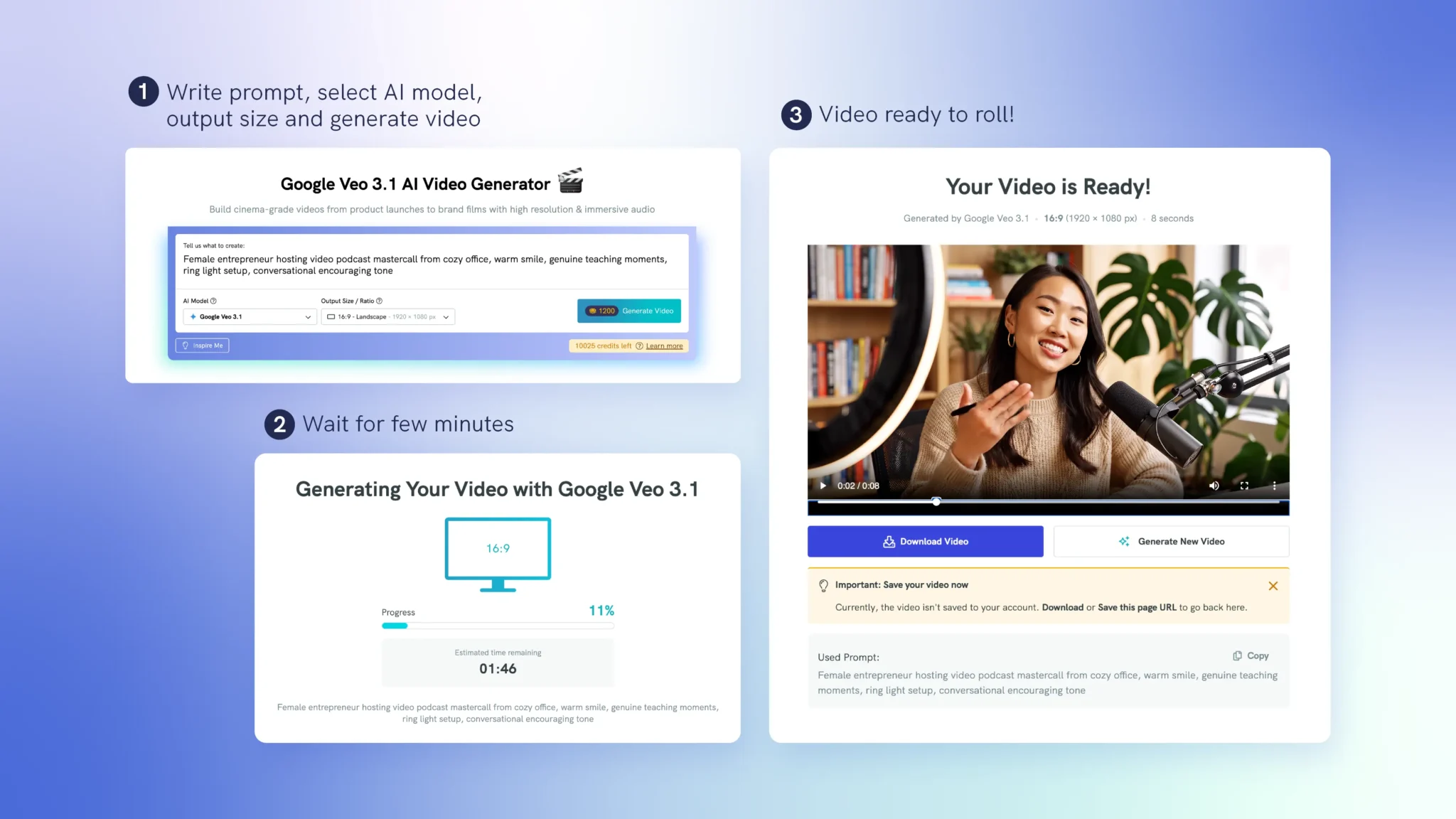
Beyond access, Piktochart wraps Veo 3.1 in a visual editing environment designed for marketers and content creators. Generate your AI video clip, then add text overlays, branding, and transitions – all in one tool. If you’re already using Piktochart for infographics, presentations, or social media content, the video generator fits into your existing workflow.
How to choose the right Sora alternative
Your use case determines the right tool:
- Professional video production: Runway (best editing) or Kling AI (best motion physics)
- Best audio + video quality: Google Veo 3.1 (or via Piktochart if geo-restricted)
- Social media content: Pika (stylized effects) or InVideo AI (full video assembly)
- Talking-head and multilingual content: HeyGen (avatars + dubbing) or Synthesia (enterprise/corporate)
- Multi-shot storytelling: Seedance 2.0 (audio-video joint generation)
- Long-form sequences: Luma AI (extension feature) or InVideo AI (30-minute videos)
- Budget-conscious creators: Kling AI ($6.99/mo) or Pika ($8/mo)
- Developers and self-hosting: Wan 2.6 (open source, Apache 2.0)